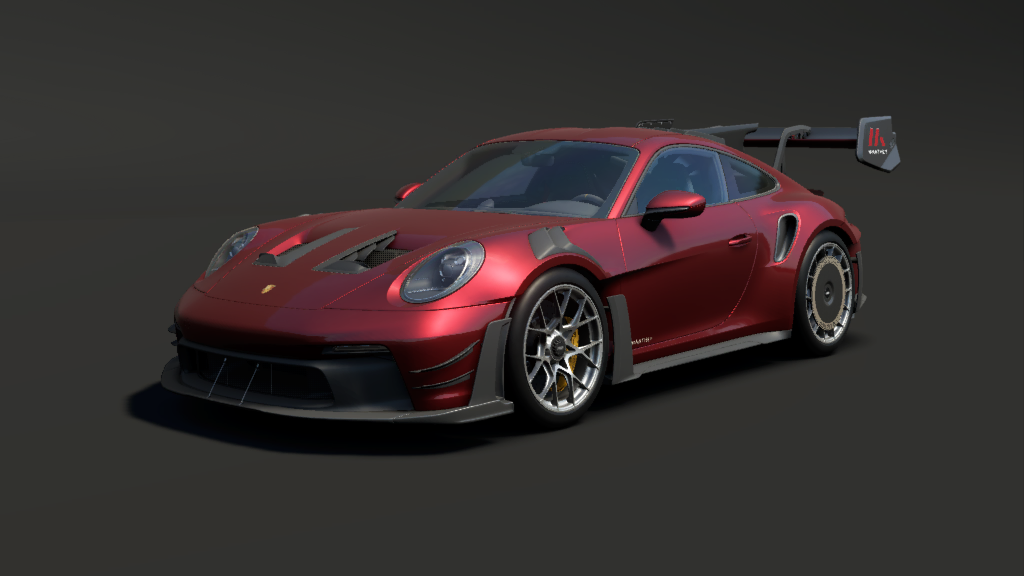
O Porsche 911 GT3 RS com preparação Manthey é a expressão máxima da performance de pista homologada para as ruas. Combinando uma aerodinâmica ativa agressiva com um chassi refinado, este esportivo oferece uma experiência de condução visceral e extremamente precisa. Com sua tração traseira e câmbio automático de trocas rápidas, ele se destaca em qualquer circuito pela sua capacidade de contornar curvas em velocidades impressionantes.
**Hi guys!**
*First of all, we would like to start by thanking all of you for the support!*
*To keep the talk short, this read me was created for you to be able how to install AC EVO mods!*
*Don't forget to join us!*
**Patreon Ceky Performance:** [https://www.patreon.com/CekyPerformance](https://www.patreon.com/CekyPerformance)
**Discord Ceky Performance:** [https://discord.gg/VmeReZv3ey](https://discord.gg/VmeReZv3ey)
**Facebook group AC EVO Mods/Ceky Performance:** [https://www.facebook.com/groups/393890899432377/](https://www.facebook.com/groups/393890899432377/)
###### ***---HOW TO INSTALL MODS IN AC EVO---***
*!If you are able to find Saved Games folder quicker (skip directly to step nr. 4)*
**1.** Open the File Explorer
**2.** Go to your main drive (where you have windows installed)
**3.** Go to Users and select your main user, ex: Ceky
**4.** Select and go into Saved Games folder
**5.** You should be able to see a folder called "ACE", select and go inside
**6.**…
O Porsche 911 GT3 RS com preparação Manthey é a expressão máxima da performance de pista homologada para as ruas. Combinando uma aerodinâmica ativa agressiva com um chassi refinado, este esportivo oferece uma experiência de condução visceral e extremamente precisa. Com sua tração traseira e câmbio automático de trocas rápidas, ele se destaca em qualquer circuito pela sua capacidade de contornar curvas em velocidades impressionantes.
**Hi guys!**
*First of all, we would like to start by thanking all of you for the support!*
*To keep the talk short, this read me was created for you to be able how to install AC EVO mods!*
*Don’t forget to join us!*
**Patreon Ceky Performance:** [https://www.patreon.com/CekyPerformance](https://www.patreon.com/CekyPerformance)
**Discord Ceky Performance:** [https://discord.gg/VmeReZv3ey](https://discord.gg/VmeReZv3ey)
**Facebook group AC EVO Mods/Ceky Performance:** [https://www.facebook.com/groups/393890899432377/](https://www.facebook.com/groups/393890899432377/)
###### ***—HOW TO INSTALL MODS IN AC EVO—***
*!If you are able to find Saved Games folder quicker (skip directly to step nr. 4)*
**1.** Open the File Explorer
**2.** Go to your main drive (where you have windows installed)
**3.** Go to Users and select your main user, ex: Ceky
**4.** Select and go into Saved Games folder
**5.** You should be able to see a folder called “ACE”, select and go inside
**6.** Inside folder “ACE”, create a new folder called “mods”. (use only small letters)
**7.** Inside mods folder, drag and drop the .kspkg file.
After you dropped the .kspkg file, you have successfully installed the mod and will be visible inside the game.
To double check you made everything correct, the path where you should drag and drop the .kspkg file should be: “\\Saved Games\\ACE\\mods”
###### *!!! If the mod is not a .kspkg file, and it is a normal folder ex: “cky\_dummy\_car”, that means the mod is Open Source / Nonenrcypted.*
If the mod is Open Source / Nonencrypted, you need to follow the next steps to successfully install it:
**1.** Inside already created “mods” folder create a new folder named “content”
**2.** Inside “content” create a new folder named “cars”
**3.** Inside “cars” , drag and drop the car folder.
After you dropped the car folder inside “cars” you have successfully installed the open source mod. DO NOT INSTALL .kspkg here. The files “.kspkg” should only be installed inside “\\ACE\\mods”
**Game on,
Team Ceky Performance**
Hi guys!
First of all, we would like to start by thanking all of you for the support!
To keep the talk short, this read me was created for you to be able how to install AC EVO mods!
Don’t forget to join us!
Patreon Ceky Performance: https://www.patreon.com/CekyPerformance
Discord Ceky Performance: https://discord.gg/VmeReZv3ey
Facebook group AC EVO Mods/Ceky Performance: https://www.facebook.com/groups/393890899432377/
—HOW TO INSTALL MODS IN AC EVO—
!If you are able to find Saved Games folder quicker (skip directly to step nr. 4)
1. Open the File Explorer
2. Go to your main drive (where you have windows installed)
3. Go to Users and select your main user, ex: Ceky
4. Select and go into Saved Games folder
5. You should be able to see a folder called “ACE”, select and go inside
6. Inside folder “ACE”, create a new folder called “mods”. (use only small letters)
7. Inside mods folder, drag and drop the .kspkg file.
After you dropped the .kspkg file, you have successfully installed the mod and will be visible inside the game.
To double check you made everything correct, the path where you should drag and drop the .kspkg file should be: “\Saved Games\ACE\mods”
!!! If the mod is not a .kspkg file, and it is a normal folder ex: “cky_dummy_car”, that means the mod is Open Source / Nonenrcypted.
If the mod is Open Source / Nonencrypted, you need to follow the next steps to successfully install it:
1. Inside already created “mods” folder create a new folder named “content”
2. Inside “content” create a new folder named “cars”
3. Inside “cars” , drag and drop the car folder.
After you dropped the car folder inside “cars” you have successfully installed the open source mod. DO NOT INSTALL .kspkg here. The files “.kspkg” should only be installed inside “\ACE\mods”
Game on,
Team Ceky Performance






![Porsche 911 [SII] Carrera Rennsport](https://brasilsimulatormods.com/wp-content/uploads/2025/02/preview-255-670x372.jpg)



 Português do Brasil
  English
  Türkçe
  Español de Argentina
  Русский